How to Track Medicine Expiry Dates in a Pharmacy and Reduce Expired Stock Loss
A pharmacy owner may only realize there is an expiry problem while cleaning a shelf at the end of the month. Several medicine boxes are found behind newer stock. Some expired a few weeks ago, while others are too close to expiry to sell or return.
The loss may look small when you check one product. But when the same problem happens across dozens of medicines, the total value can become significant.
Knowing how to track medicine expiry dates in pharmacy inventory is therefore not only about checking printed dates. It requires accurate batch records, timely alerts, proper shelf arrangement, supplier return planning, and regular reporting.
Without a reliable process, expired medicines can block working capital, create safety risks, reduce inventory accuracy, and damage customer trust.
Why Medicine Expiry Tracking Is Important in a Pharmacy
Medicine expiry tracking is more than walking through the pharmacy once a month and checking labels.
Each medicine may have multiple batches, different purchase dates, different expiry dates, and different quantities. Unless these details are recorded correctly, staff may sell from the wrong batch while an earlier-expiring batch remains on the shelf.
An effective pharmacy expiry management process helps protect several areas of the business.
Patient safety
Expired medicines must not remain available for sale. Accurate tracking helps staff identify expired batches before they reach customers.
Financial control
Every expired product represents money that the pharmacy invested but could not recover. That money could have been used to buy faster-moving products or cover other business expenses.
For example, losing $50 worth of medicine each month may not appear serious. Over one year, however, the pharmacy loses $600. In a larger pharmacy or multi-branch operation, the loss can be much higher.
Inventory accuracy
Your system may show that ten boxes are available, but three may already be expired. Without batch-level tracking, the stock report gives a misleading picture.
Supplier return opportunities
Many suppliers allow near-expiry products to be returned or replaced, provided the pharmacy contacts them before a specific deadline. Early identification gives you time to recover part or all of the stock value.
Customer trust
Customers expect a pharmacy to maintain safe and well-managed stock. Finding an expired product on a normal shelf can quickly damage confidence in the business.
Why Manual Expiry Registers Often Fail
Many small pharmacies use paper registers, Excel files, notebooks, handwritten labels, or monthly shelf checks.
These methods are not completely useless. They may work when the pharmacy has a very small number of products and one person handles all purchasing and sales.
The problems usually begin when stock volume increases.
A common mistake pharmacy owners make is recording an expiry date without recording the batch number. If two batches of the same medicine arrive with different expiry dates, the register cannot clearly show which quantity belongs to which batch.
Manual systems also create several practical problems:
- Staff may forget to update the register after receiving stock.
- Excel files may not match the actual shelf quantity.
- There is no automatic reminder for near-expiry items.
- One employee may overwrite another employee’s information.
- Expiry dates may be recorded but never reviewed.
- Medicines may be sold from a newer batch instead of an earlier-expiring batch.
- Separate branches may maintain records differently.
From my experience, checking expiry dates only once a month is not enough. By the time you identify a medicine, the supplier return deadline may already have passed.
Manual tracking can still support a small pharmacy, but the process must be consistent, batch-based, and reviewed regularly.
How to Record Medicine Batch Numbers and Expiry Dates
Accurate medicine batch tracking starts when stock enters the pharmacy.
Do not wait until products are placed on shelves. Record the batch information while receiving the supplier delivery and verifying the purchase invoice.
For every purchased batch, record:
- Medicine or product name
- Generic name, when relevant
- Batch or lot number
- Supplier name
- Purchase invoice number
- Purchase date
- Manufacturing date, if available
- Expiry date
- Purchased quantity
- Remaining quantity
- Purchase cost
- Selling price
- Storage location
- Supplier return eligibility date
- Current stock status
Two batches of the same medicine must be stored separately in your records because their expiry dates and remaining quantities are different.
| Product | Batch Number | Purchase Date | Expiry Date | Purchased Quantity | Remaining Quantity |
| Paracetamol 500 mg | PCM-24081 | 10 January 2026 | 30 November 2026 | 100 boxes | 25 boxes |
| Paracetamol 500 mg | PCM-25114 | 15 March 2026 | 31 May 2027 | 150 boxes | 140 boxes |
In this example, both rows represent the same product, but the first batch expires earlier. Staff should sell from batch PCM-24081 before using the newer batch.
The easiest way to handle this is to treat every batch as a separate inventory record while keeping it connected to the main product.
How to Identify Near-Expiry Medicines Early
A medicine should not suddenly become a problem on the day it expires.
Your process should identify risk several months earlier. Near-expiry medicine tracking allows you to review sales speed, rearrange stock, contact suppliers, and prevent unnecessary loss.
You can create alert periods such as:
| Alert Period | Recommended Action |
| Within 180 days | Review sales speed and remaining quantity |
| Within 90 days | Prioritize the batch and check return conditions |
| Within 60 days | Contact the supplier and prepare return documents |
| Within 30 days | Remove, isolate, or return the batch if it is unlikely to sell safely |
The correct alert period may vary depending on:
- Product type
- Average sales speed
- Supplier return policy
- Remaining quantity
- Pharmacy size
- Seasonal demand
- Local regulations
For example, a fast-moving pain reliever may sell well before its expiry date, even with 90 days remaining. A slow-moving specialist medicine may require action when six months of shelf life remain.
Prescription medicines must never be promoted or discounted in ways that violate local laws, professional ethics, or pharmacy regulations. The objective is to manage stock responsibly, not to encourage inappropriate medicine sales.
Use the FEFO Method in Pharmacy Inventory
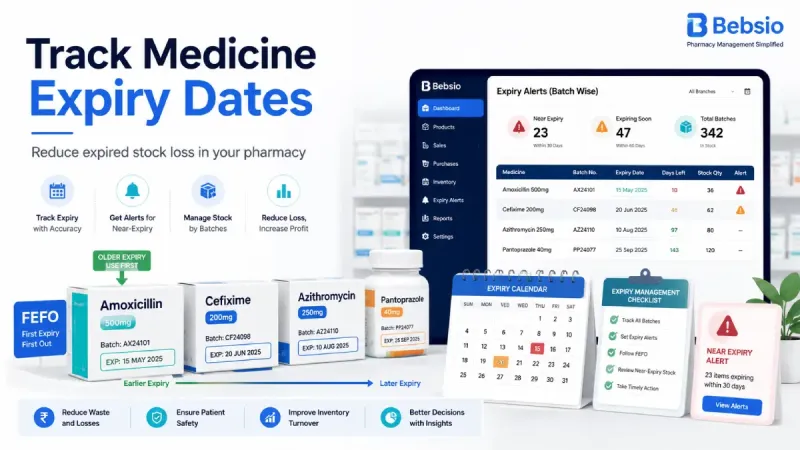
FEFO means First Expired, First Out.
It means the batch with the earliest expiry date should be sold or issued first.
FEFO is different from FIFO, which means First In, First Out. In ordinary retail inventory, the batch purchased first may often be sold first. In a pharmacy, however, the first batch purchased does not always expire first.
Imagine that you purchase one batch in January that expires in December 2027. In March, you receive another batch that expires in August 2027.
Using FIFO, you would sell the January batch first. Using FEFO, you should sell the March batch first because it expires earlier.
Pharmacy staff can apply FEFO through:
- Proper shelf arrangement
- Batch-aware billing
- Barcode or batch selection
- Picking instructions
- Regular shelf checks
- Software-generated batch recommendations
Practical FEFO checklist
- Confirm the expiry date while receiving stock.
- Keep earlier-expiring batches at the front.
- Keep later-expiring batches behind them.
- Do not mix batches without clear labels.
- Select the correct batch during billing.
- Review shelf placement every week.
- Investigate when the system recommends one batch but staff select another.
FEFO only works when both the physical shelf and the software records are accurate.
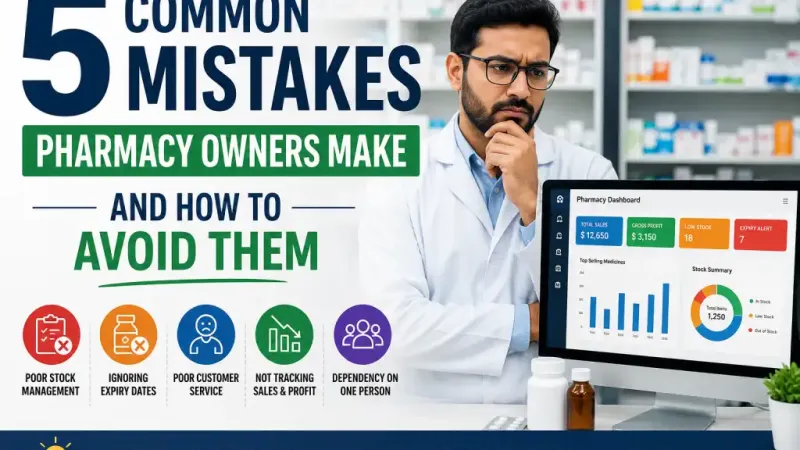
Read More: 5 Common Mistakes Pharmacy Owners Make and How to Avoid Them
Create a Supplier Return Workflow for Near-Expiry Medicines
Pharmacy owners often lose money because they contact the supplier too late.
A supplier may accept a return only when 60, 90, or more days of shelf life remain. Waiting until the medicine expires can remove your opportunity to receive a replacement or credit.
Use a structured supplier return process:
- Identify returnable near-expiry medicines.
- Check the supplier’s return policy.
- Verify the purchase invoice and batch information.
- Create a supplier return note.
- Remove the returned quantity from sellable inventory.
- Record the supplier credit note or replacement stock.
- Update the supplier ledger.
- Keep proof of collection, delivery, or return acceptance.
The return note should include the product name, batch number, expiry date, quantity, purchase invoice, unit cost, total value, and reason for return.
Do not reduce available stock only after the supplier confirms the credit. Once the physical products leave your pharmacy, they should no longer appear as sellable inventory.
Separate Expired Stock from Sellable Inventory
When a medicine expires, stop sales immediately.
Do not leave the batch on a normal shelf while waiting for disposal, supplier collection, or management approval.
Follow these steps:
- Mark the batch as expired.
- Remove it from the sales shelf.
- Move it to a clearly identified quarantine or expired-stock area.
- Block the batch from billing in the POS system.
- Record the expired quantity and financial value.
- Record whether it will be returned, destroyed, or handled by an approved provider.
- Keep evidence of return or disposal.
Never give general staff access to return expired medicines to active stock without approval.
Disposal requirements vary by country and product type. Follow instructions from the relevant drug authority, supplier, manufacturer, or licensed disposal provider. Do not use informal disposal methods that may create health or environmental risks.
Create an Expired Medicine Inventory Report
An expired medicine inventory report helps you understand not only what expired, but why it expired.
The report should include:
- Product name
- Batch number
- Expiry date
- Expired quantity
- Purchase cost
- Total loss value
- Supplier
- Reason for expiry
- Return status
- Disposal status
- Responsible branch or storage location
A useful medicine expiry report can reveal:
- Excessive purchasing
- Slow-moving medicines
- Missed supplier return deadlines
- Staff errors
- Incorrect reorder levels
- Seasonal demand changes
- Poor stock transfers between branches
You should also monitor practical pharmacy expiry KPIs:
- Value of stock expiring within 90 days
- Monthly expired stock loss
- Expired stock as a percentage of purchases
- Supplier return recovery amount
- Number of batches sold using FEFO
- Slow-moving near-expiry products
- Value of expired stock by supplier
- Value of expired stock by branch
The objective is not only to produce a report. The report should influence future purchasing decisions.
If one product expires repeatedly, reduce its reorder quantity. If a supplier regularly rejects returns, review the purchasing agreement. If one branch has higher expiry loss, investigate its local process.
How Pharmacy Software Automates Expiry Tracking
As a pharmacy grows, manual expiry management becomes difficult to maintain.
Modern pharmacy inventory management software can automate many repetitive tasks, including:
- Batch-wise stock entry
- Expiry date validation
- Near-expiry notifications
- Dashboard alerts
- FEFO-based batch suggestions
- Blocking expired batches at checkout
- Supplier return records
- Expired stock reports
- Multi-branch expiry tracking
- Email, SMS, or in-app alerts
- Role-based responsibility for expiry review
A pharmacy management system such as Bebsio can help pharmacy owners keep batch numbers, expiry dates, supplier information, and stock quantities in one place.
Instead of searching every shelf manually, the owner can review near-expiry and expired stock reports from the dashboard. Staff can also receive a warning when they attempt to select an expired batch or ignore an earlier-expiring batch.
Software does not guarantee that a pharmacy will have zero expired stock. Staff still need to receive products correctly, arrange shelves properly, and follow up with suppliers.
However, a reliable pharmacy inventory expiry alert system makes problems visible early enough for the owner to take action.
A Simple Daily, Weekly, and Monthly Expiry Management Routine
A good expiry process does not need to be complicated. It needs to be consistent.
Daily
- Follow FEFO during every sale.
- Review critical expiry alerts.
- Prevent expired batch sales.
- Verify batch and expiry information for newly received stock.
- Investigate unusual batch selections at checkout.
Weekly
- Review medicines expiring within 30, 60, and 90 days.
- Rearrange shelves according to FEFO.
- Contact suppliers about returnable stock.
- Review slow-moving near-expiry batches.
- Compare physical quantities with system quantities.
Monthly
- Generate the expired stock report.
- Calculate total expiry loss.
- Review supplier return recovery.
- Adjust purchase quantities.
- Update reorder levels.
- Review branch-wise expiry performance.
- Train staff who handle receiving, shelving, and billing.
Assign a specific person to each review. When everyone is responsible, expiry management often becomes no one’s responsibility.
Common Medicine Expiry Tracking Mistakes
1. Recording expiry dates without batch numbers
Problem: You cannot identify which quantity belongs to which expiry date.
Solution: Record every purchase batch separately.
2. Mixing two batches together
Problem: Staff cannot easily follow FEFO.
Solution: Separate batches physically and digitally.
3. Checking expiry only once a month
Problem: Supplier return deadlines may be missed.
Solution: Review critical alerts daily and complete a detailed review weekly.
4. Ignoring supplier return deadlines
Problem: Returnable stock becomes a full financial loss.
Solution: Record the last eligible return date for every supplier or batch.
5. Selling using FIFO instead of FEFO
Problem: A later-purchased batch with an earlier expiry may remain unsold.
Solution: Prioritize expiry date rather than purchase date.
6. Keeping expired products on normal shelves
Problem: The products may accidentally be sold.
Solution: Move them immediately to a controlled quarantine area.
7. Ignoring the financial value of expired stock
Problem: Management sees quantities but not the true business impact.
Solution: Calculate loss using purchase cost and expired quantity.
8. Allowing unrestricted expiry record editing
Problem: Dates or quantities may be changed without accountability.
Solution: Use role-based permissions and maintain an activity log.
9. Buying excessive stock because of supplier discounts
Problem: The discount appears profitable, but slow sales cause expiry loss.
Solution: Compare the offered quantity with actual sales speed and remaining shelf life.
Final Thoughts
Expiry loss is rarely caused by one large mistake.
It is usually the result of small daily process failures: a batch number was not entered, an earlier-expiring box was placed behind newer stock, a supplier was contacted too late, or an expiry report was generated but never reviewed.
The best approach to how to track medicine expiry dates in pharmacy inventory is to begin with four basic controls: accurate batch records, early expiry alerts, FEFO-based sales, and regular reporting.
Start with the products that carry the highest value or expire most frequently. Improve the process gradually, assign clear responsibility, and use software where manual tracking is no longer reliable.
Frequently Asked Questions
1. What is the best way to track medicine expiry dates in a pharmacy?
The best method is batch-level tracking. Record the batch number, expiry date, supplier, quantity, purchase cost, and remaining stock for every batch. Use alerts and FEFO to prioritize earlier-expiring products.
2. How often should pharmacy expiry dates be checked?
Critical alerts should be reviewed daily, near-expiry lists should be reviewed weekly, and detailed expiry-loss reports should be reviewed monthly.
3. What is a near-expiry medicine?
A near-expiry medicine is a product approaching its expiry date and requiring review. The period may be 30, 60, 90, or 180 days depending on sales speed, supplier policy, and product type.
4. What is FEFO in pharmacy inventory?
FEFO means First Expired, First Out. It requires staff to sell or issue the batch with the earliest expiry date before batches that expire later.
5. How can pharmacy software prevent expired medicine sales?
Software can mark expired batches as unavailable, block them at checkout, display warnings, and recommend the correct FEFO batch during billing.
6. Can near-expiry medicines be returned to suppliers?
Many suppliers accept near-expiry returns under specific conditions. The pharmacy must check the supplier’s return period, invoice requirements, batch details, and remaining shelf-life rules.
7. What information should be included in a medicine expiry report?
The report should include the product, batch number, expiry date, quantity, purchase cost, total loss, supplier, return status, disposal status, and storage location or branch.
8. How should expired medicines be removed from active inventory?
Mark the batch as expired, block sales, move it to a separate quarantine area, record the quantity and value, and follow the applicable return or disposal process.
9. Is Excel enough for pharmacy expiry management?
Excel may work for a very small pharmacy with limited stock. As product volume, staff, suppliers, or branches increase, dedicated pharmacy software is usually more reliable because it provides alerts, permissions, and batch-wise inventory control.
10. How can a pharmacy reduce expired stock loss?
Maintain accurate batch records, use FEFO, create early alerts, review slow-moving products, return stock before supplier deadlines, adjust purchasing quantities, and analyze monthly expiry reports.