How to Reduce Stock Loss in Your Shop Using Inventory Software
Introduction: Stock Loss Is Silent, But It Hurts Your Profit
Every shop owner knows the feeling.
You buy products, arrange them nicely, sell every day, and work hard to serve customers. But at the end of the month, the profit does not look right. Some products are missing. Some expired. Some were damaged. Some were sold but not recorded properly. And sometimes, you only realize the problem when it is already too late.
This is called stock loss, and it is one of the biggest hidden problems in retail businesses.
Whether you run a small grocery store, a pharmacy, a clothing boutique, a cosmetics shop, an electronics store, or any local retail business, stock loss can slowly reduce your profit without making much noise.
The good news is that you can control it.
With the right inventory software, you can track your products, monitor stock movement, reduce mistakes, and make better business decisions. In this article, we will explain how inventory software helps reduce stock loss in a simple and practical way.
What Is Stock Loss?
Stock loss means the difference between the stock you should have and the stock you actually have.
For example, your records say you should have 50 bottles of shampoo. But when you count the shelf, you find only 43. That means 7 items are missing or unaccounted for.
Stock loss can happen for many reasons. Some are small mistakes. Some are serious business problems. But all of them affect your profit.
Common Reasons for Stock Loss in Shops
Before solving the problem, you need to understand where stock loss usually comes from.
Here are some common reasons:
- Wrong stock entry when new products arrive
- Manual calculation mistakes
- Products sold but not recorded
- Damaged items
- Expired products
- Theft or unauthorized use
- Wrong pricing or discount mistakes
- Supplier delivery mismatch
- Return items not updated in stock
- No regular stock checking system
Many shop owners depend on notebooks, Excel sheets, or memory. These may work in the beginning, but when the business grows, mistakes become more common.
Why Manual Stock Tracking Often Fails
Manual tracking looks simple, but it depends too much on human attention. And in a busy shop, it is normal to miss things.
Imagine this situation:
A customer is waiting. Another customer is asking for a product. A supplier is delivering new stock. Your staff is making a bill. At the same time, someone forgets to update the stock register.
This kind of mistake may look small, but if it happens every day, the loss becomes big.
Manual systems also make it hard to know:
- Which products are selling fast
- Which products are not moving
- Which items are near expiry
- Which products need reordering
- Which staff made a specific sale
- Which supplier delivered less than expected
That is why modern shops are moving to smart inventory software.
Manual Tracking vs. Smart Inventory Software
| Area | Manual Tracking | Smart Inventory Software |
| Stock updates | Written by hand or entered later | Updated automatically after sales and purchases |
| Error risk | High | Much lower |
| Expiry tracking | Easy to forget | Alerts before expiry |
| Stock reports | Time-consuming | Available instantly |
| Sales connection | Often separate from stock | Sales and stock are connected |
| Product history | Hard to find | Easy to track |
| Low stock alert | Usually missed | Automatic notification |
| Staff accountability | Difficult | Easier to monitor |
| Decision making | Based on guesswork | Based on real data |
How Inventory Software Helps Reduce Stock Loss
1. Real-Time Stock Updates
One of the biggest benefits of inventory software is real-time stock tracking.
When you sell a product, the system automatically reduces the stock. When you purchase new products, the system adds them to your inventory.
This means you always have a clearer picture of your stock position.
You do not need to wait until the end of the day or end of the month to know what is happening. You can see product movement as it happens.
2. Low Stock Alerts
Running out of popular products is another form of loss. If a customer comes to buy something and you do not have it, they may go to another shop.
Inventory software can alert you when stock becomes low.
For example, you can set a minimum stock level for each product. When the stock goes below that level, the system reminds you to reorder.
This helps you avoid:
- Lost sales
- Emergency purchases
- Customer disappointment
- Over-dependence on guesswork
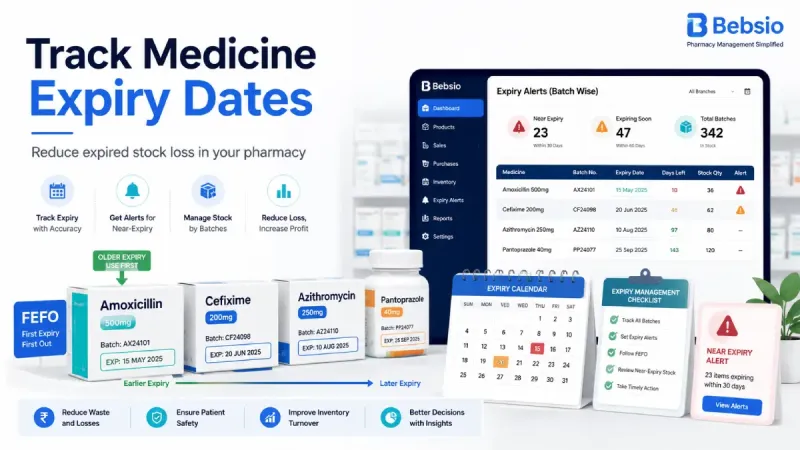
3. Expiry Date Management
For pharmacies, grocery stores, cosmetics shops, and food businesses, expiry tracking is very important.
Expired products are direct losses. They also create customer trust issues if not handled properly.
Smart inventory software helps you track expiry dates and identify products that are close to expiry. This gives you time to take action, such as:
- Selling them earlier
- Offering controlled discounts
- Returning them to suppliers if possible
- Avoiding over-purchase next time
Key Takeaway: Automation does not replace the shop owner’s experience. It supports that experience with accurate data, timely alerts, and better control.
4. Product-Wise Stock History
Sometimes you need to know what happened to a product.
When was it purchased? Who sold it? Was it returned? Was stock adjusted? Did the supplier deliver the correct quantity?
Inventory software keeps a product-wise history, so you can check past activity whenever needed.
This is very helpful when you want to investigate stock mismatch or understand product performance.
5. Better Purchase Planning
Many stock losses happen because shop owners buy too much of the wrong product.
Maybe a product sold well last season, but now demand is low. Maybe you bought extra stock because the supplier gave a discount. Maybe you guessed the demand without checking actual sales data.
Inventory software helps you make smarter purchase decisions by showing:
- Fast-moving products
- Slow-moving products
- Seasonal demand
- Stock value
- Sales trends
- Purchase history
When you buy based on data, you reduce overstocking and dead stock.
6. Easier Stock Adjustment
In real business, stock adjustment is sometimes necessary.
Products may be damaged. Some items may be used for display. A customer return may need correction. Sometimes physical count and system count may not match.
Inventory software allows you to adjust stock properly with a reason.
This creates a clear record instead of silent changes. Over time, it helps you understand why stock differences happen.
7. Improved Staff Accountability
If multiple people work in your shop, it becomes important to know who did what.
A good inventory system can help track sales, returns, discounts, and stock changes by user or staff account.
This does not mean you do not trust your team. It simply creates a more responsible business environment.
When everyone knows the system is recording actions properly, mistakes and misuse often reduce naturally.
Key Features to Look for in Inventory Software
Not all software is the same. Before choosing one, look for features that actually help your daily business.
Important features include:
- Product and category management
- Purchase and sales tracking
- Stock history
- Low stock alerts
- Expiry date alerts
- Barcode support
- Return management
- Supplier records
- Customer due tracking
- Profit and loss reports
- Easy billing or POS system
- Multi-user access
- Cloud-based access from anywhere
The best software is not always the most complicated one. The best software is the one you and your team can use easily every day.
Practical Tips to Reduce Stock Loss Faster
Inventory software works best when you also follow good business habits.
Here are some simple tips:
Set Minimum Stock Levels
Do not wait until stock becomes zero. Set reorder levels for important products.
Count Stock Regularly
Do small stock checks weekly instead of doing one big count after many months.
Record Every Purchase Immediately
Do not keep supplier invoices pending for too long. Enter purchase data as soon as possible.
Track Damaged and Expired Products
Do not mix damaged or expired items with normal sellable stock.
Train Your Staff
Make sure your staff understands how to bill, return, and update stock correctly.
Review Reports Every Week
Spend a few minutes every week checking stock reports. Small reviews can prevent big losses.
Is Inventory Software Only for Big Shops?
No. This is a common misunderstanding.
Inventory software is useful for both small and large shops.
In fact, small shops often need it more because every loss matters. A big company may survive stock mistakes, but a small business feels the pressure quickly.
Even if you sell 50 products or 5,000 products, having clear stock control gives you peace of mind.
Final Thoughts: Less Guesswork, More Control
Stock loss is not always visible. But it affects your cash flow, profit, customer service, and business growth.
You cannot control everything manually forever. As your shop grows, you need a system that helps you stay organized.
Inventory software helps you reduce stock loss by tracking products, updating stock automatically, sending alerts, recording history, and giving you useful reports.
The goal is simple: less confusion, fewer mistakes, and better control over your business.
If you are still managing your shop with notebooks or scattered spreadsheets, this may be the right time to try a modern inventory solution.
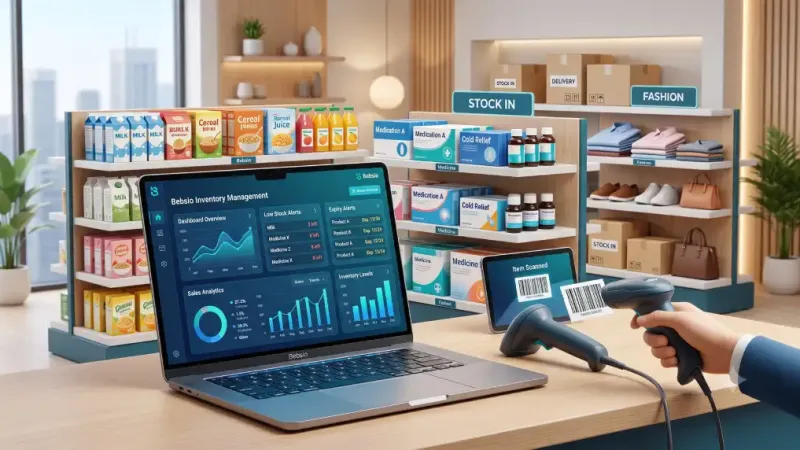
With a platform like Bebsio, shop owners can manage stock, sales, purchases, customers, suppliers, and reports from one place. It is built to make daily shop management easier, cleaner, and more reliable.
Start small. Track better. Reduce loss. Grow with confidence.